
Product Bundle, part of the GoCloudz CPQ suite, helps Product Managers create and price configurable bundles while giving Sales Reps a faster way to add accurate Products and Bundles to Opportunities, Quotes, and Orders.

Product Bundle is a 100% Salesforce-native Lightning application that uses standard Products, Price Books, and line-item objects

Key Features
  • Create Bundles using standard Salesforce Products
  • Supports nested Bundles
  • Configure Bulk pricing, Tiered pricing, and Attribute-based pricing
  • Control product selection with Bundle Rules and Segmentation
  • Support custom fields through configurable metadata
  • Apply approval processes before Bundles become available for sale
  • Add standalone Products and Bundles to Opportunities, Quotes, and Orders
  • Establish and edit Opportunity Product Schedules
  • Support multiple Price Books and Currencies
  • Clone Bundles with their items and configuration
  • Bulk refresh pricing and manage end-of-life Products
  • Retain standard Salesforce security, reporting, automation, and integrations
  • Integrate with PDF Generator for branded customer documents
Application Workflow

The configuration steps are generally completed by administrators or product managers. After a Bundle is approved, sales representatives can search, configure, and add it to a transaction.
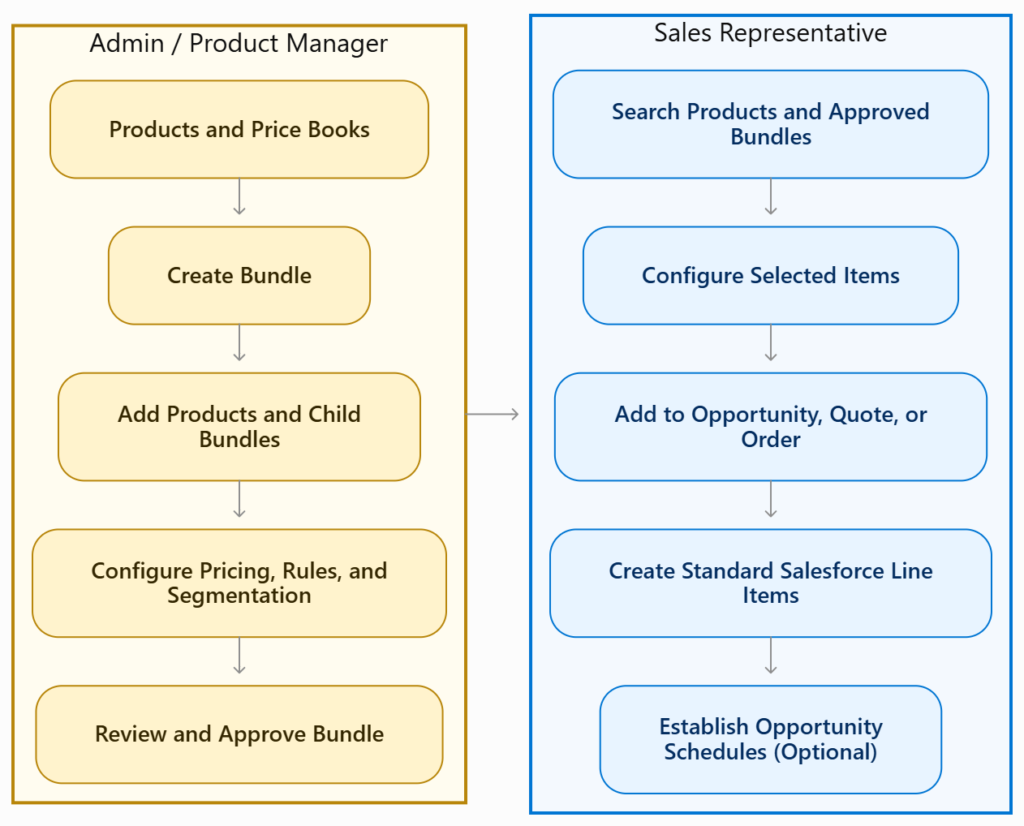
Product Bundle flow diagram
About This Guide​
  • This guide covers the Product Bundle Lightning Web Component framework in Lightning Experience.
  • Examples primarily use Opportunities and Opportunity Products. Similar steps apply to Quotes, Quote Line Items, Orders, and Order Products.
  • Product Scheduling applies only to Opportunities and requires Salesforce Product Schedules to be enabled.
  • Familiarity with Salesforce Products, Price Books, Opportunities, Quotes, Orders, and their line items is helpful.
Other GoCloudz Applications