
SaaS pricing rarely fits on a single line. A typical deal combines a core platform subscription, user licenses priced by volume, optional add-on modules, a support plan, and onboarding services, often billed over months or years. Asking reps to rebuild that package product by product on every Opportunity is slow and invites mistakes. With SaaS product bundles in Salesforce, you define the package once and reps add it in a few clicks.
GoCloudz Product Bundle is a 100% Salesforce-native app that lets you package those offerings once and reuse them on every deal. Here’s how SaaS teams can put it to work.
Package SaaS Editions as Product Bundles
Create a bundle for each edition you sell, such as a Cloud CRM Enterprise Subscription, and add the Products that belong in it. Mark the items every customer must buy as Required so reps can’t remove them, and leave the rest optional.
Add-ons can be packaged as child bundles. For example, an Advanced Analytics Add-On can sit inside the Enterprise Subscription as a child bundle, so reps add it as one unit instead of hunting for its components.
Price Licenses by Volume
Volume Pricing handles quantity-based license pricing automatically. Each Product can use one of two models:
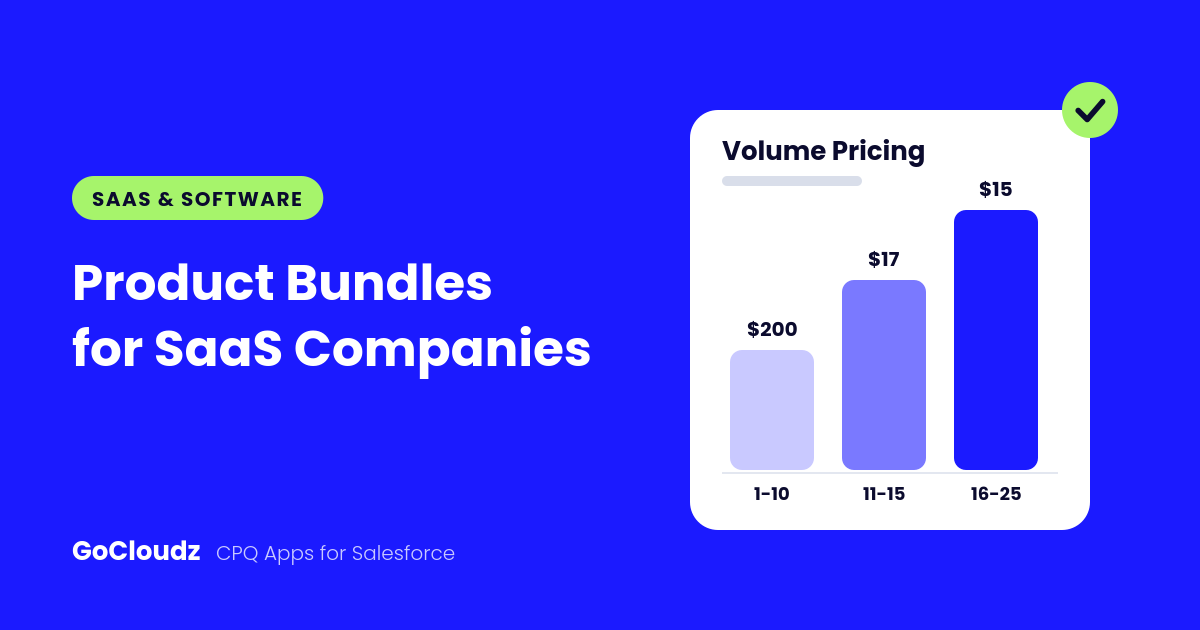
- Bulk: the price of the matching quantity range applies to every unit. If 16 to 25 seats cost $15 each, an order for 25 seats prices all 25 at $15.
- Tiered: the quantity is split across ranges. With a $200 group price for the first 10 seats, $17 for the next 5, and $15 for the next 10, 25 seats total $435, an effective $17.40 per seat.
When a rep changes the quantity, the app finds the matching range and recalculates the line. Reps can click the Volume Pricing icon to see every range and which one applies.
Price by Subscription Term, Not by SKU
Instead of maintaining separate Products for 3-, 6-, and 12-month licenses, keep one CRM User License Product and add a Subscription Duration picklist. Attribute Pricing then sets the Sales Price, Discount, or Margin based on the term the rep selects. Rules can combine conditions, such as a 6-month term and a Renewal deal type, and Account-specific rules take priority over your default pricing.
Enforce Valid Configurations
Bundle Rules control how many items a rep can select from each category. A SaaS bundle might require:
- Exactly one core product
- One or two support options
- No more than two professional services items
- Any number of add-ons
If a selection breaks a rule, the app shows your error message, highlights the affected category, and blocks the update until it’s fixed.
Tailor SaaS Product Bundles by Customer Segment
Segmentation lets you offer different bundles and volume pricing to Small Business, Mid-Market, Enterprise, Partner, or Public Sector deals. Set the Segment on the Opportunity, and reps see only the bundles and pricing rules for that segment, plus any that are unrestricted.
Schedule Recurring Revenue
For subscriptions recognized over time, Product Bundle works with Salesforce Product Scheduling. After configuring the cart, reps click Schedule to set up Quantity or Revenue schedules for all eligible Opportunity Products from one screen. For example, $1,200 of annual revenue divided over 12 monthly installments produces 12 installments of $100. Scheduling is available on Opportunities and needs a one-time setup by your Salesforce admin.
Keep SaaS Product Bundles 100% Native in Salesforce
Every bundle item is saved as a standard Opportunity Product, Quote Line Item, or Order Product. Your reports, forecasts, approvals, Flows, and integrations keep working without changes.
Ready to simplify SaaS quoting? Learn more about Product Bundle or start a free trial on AppExchange.